Fix "AMD-Vi: Completion-Wait loop timed out" on EPYC Platform
This posts documents how I fixed AMD-Vi: Completion-Wait loop timed out error in kernel log (which then caused a crash). on my proxmox homelab.

This post is a follow up of my previous post Fix Proxmox Bootloop Triggered by Problematic Hardware and Auto Start VM. Check it out if you want to prevent a bootloop next time issues like this happens.
I recently pulled out my Intel DG1 from the Proxmox homelab and sold it on facebook marketplace. However, the system entered a bootloop with that device removed and after some investigation I found a lot of AMD-Vi: Completion-Wait loop timed out messages in kernal log, before the system become unresponsive and got kicked into reboot by onboard watchdog.
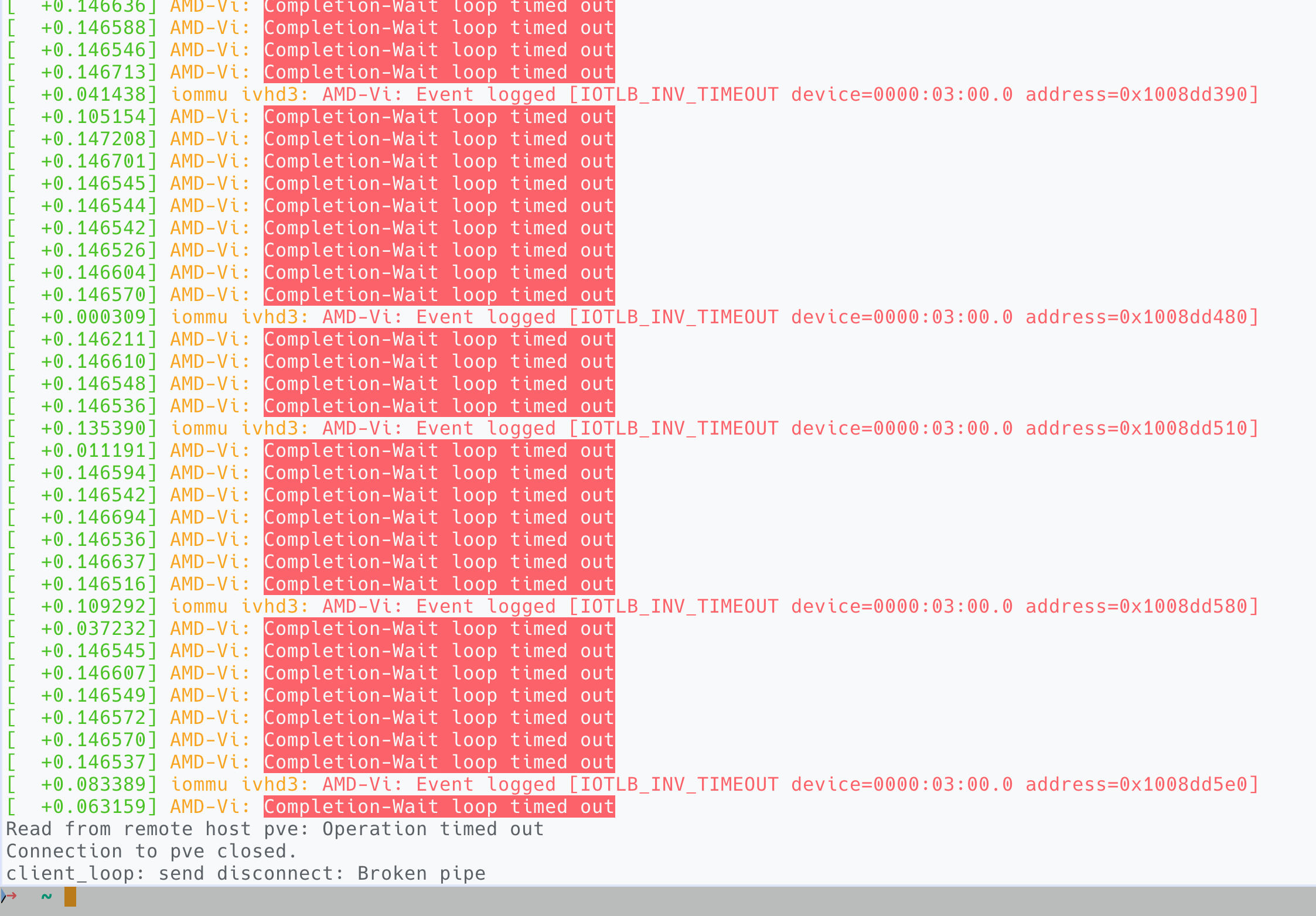
dmesg log shortly before the system crashesThe error was triggered upon the start of win-vm, which had an Intel B580 passed through. Remove the B580 it worked fine, bind the B580 to a linux VM the problem persists again. Don't passthrough and use it on host it worked fine. Therefore, I determined the problem to be originated from faulty B580 configuration.
Now, since I'm no expert at virtualisation or CPU architecture, to solve this issue I employed my favourite method of throwing shit at the wall until it sticks". Basically I would change some setting I (or GPT, or stackoverflow) think was relevant, reboot and test it; if it doesn't work then I change something else until problem eventually go way. In this post I document my working solution, and then my theory of why it worked but again it might be complete bs.
Diagnosis & What worked
Now, since this problem appeared when I pulled out another PCIE card, I determined it was due to IOMMU / PCIE isolation problem. Maybe a change in PCIE configuration plus previously incorrectly configurations caused this problem.
Blacklisting Drivers
I first made sure that B580 only binds to vfio-pci driver by blacklisting xe and i915. Edit /etc/modprobe.d/vfio.conf
blacklist xe
blacklist i915

# 03:00.0 VGA compatible controller [0300]: Intel Corporation Battlemage G21 [Arc B580] [8086:e20b]
#         Subsystem: Intel Corporation Device [8086:1100]
options vfio-pci ids=<...> 8086:e20b,<...> disable_idle_d3=1

# <...> means other devices you want to bind to vfio-pci
If mutiple Intel GPUs coexist and at least one of them is used by the host, instead of blacklisting drivers, add:
softdep xe        pre: vfio-pci
softdep i915        pre: vfio-pci
So device will bind to vfio-pci before xe and i915 are loaded.
Execute:
update-initramfs -u
update-grub
reboot
Then check the config using lspci -nnk | vim -
...skipping...
03:00.0 VGA compatible controller [0300]: Intel Corporation Battlemage G21 [Arc B580] [8086:e20b]
        Subsystem: Intel Corporation Device [8086:1100]
        Kernel driver in use: vfio-pci
        Kernel modules: xe
...
vfio-pci in use. Settings are correct.
This confirms the settings are effective.
Note several behaviours about modprobe
- modprobe will concatenate all
.conffiles undermodprobe.dinto one and load it. Incorrectly configured lines simply got ignored - To check currently applied modprobe settings , use
modprobe --showconfig option vfio-pci ids=...is not cumulative. If multiple declarations exists in either same file or different files under/etc/modprobe.dthe latest will simply overwrite all others. So make sure only keep one copy- If
vfio-pci ids=...config also exist in/etc/default/grubcmdline, it will have the highest priority and overshadow configs in themodprobe.dfolder. It will also be load earlier.
For more information, check this article on Arch wiki.
Change BIOS Settings
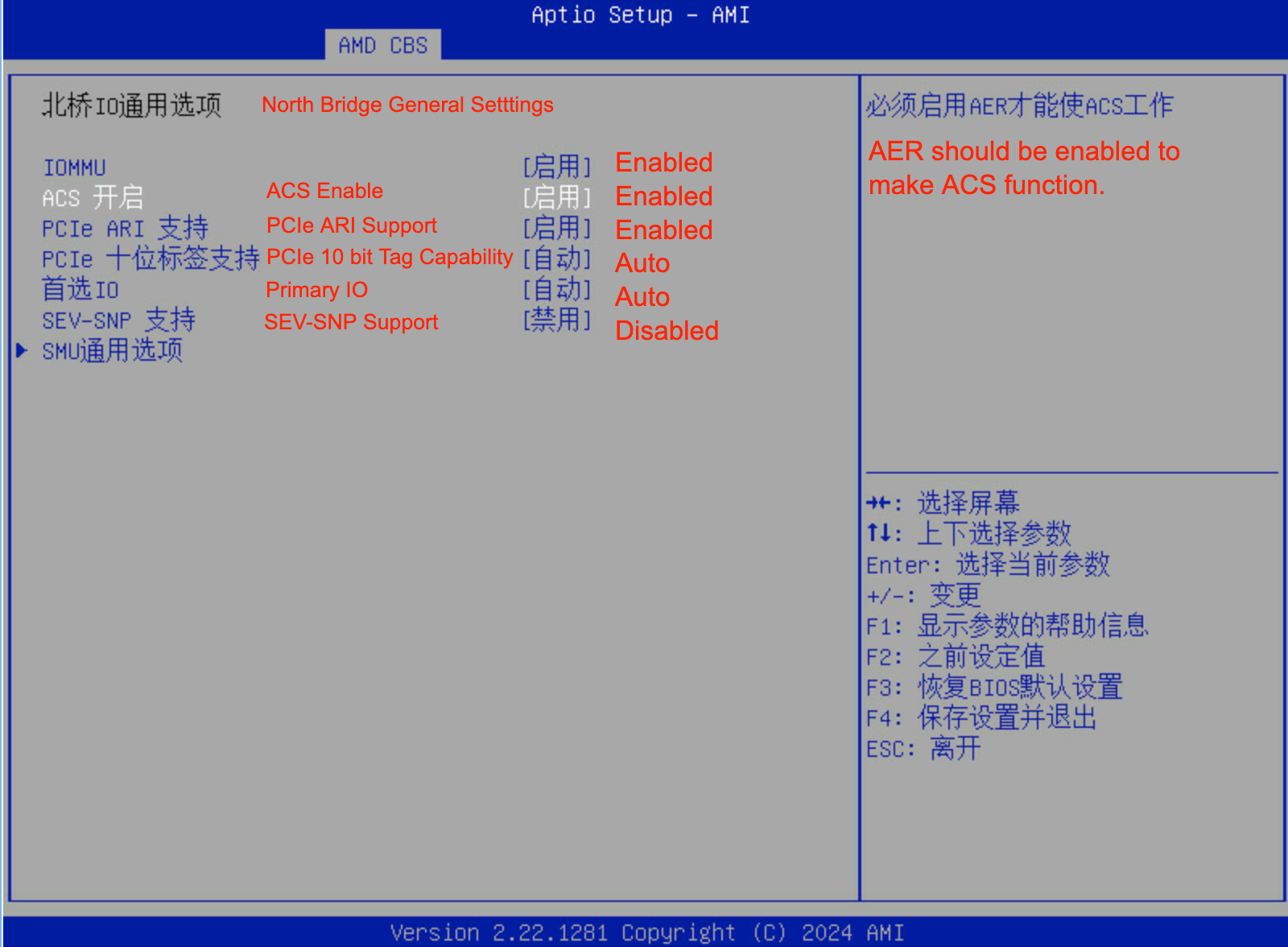
Tweak these settings in BIOS:
|
Setting |
Recommended Setting |
Meaning |
|---|---|---|
|
IOMMU |
Enable |
Turns on the AMD IOMMU hardware unit that provides device isolation and DMA remapping for VFIO. Must be enabled for GPU passthrough or device isolation to work. |
|
ACS Enable |
Enable |
Enables Access Control Services (ACS), allowing true PCIe isolation between slots. If enabled in BIOS, you can remove pcie_acs_override=downstream from GRUB. |
|
PCIe ARI Support |
Enable |
Enables Alternative Routing-ID Interpretation (ARI), required for devices exposing multiple functions such as SR-IOV or multi-function GPUs. Safe and often necessary. |
|
PCIe 10-bit Tag Support |
Auto |
Allows devices to use 10-bit PCIe request tags for higher queue depth and throughput. It is a performance feature, not relevant to VFIO stability. |
|
Preferred I/O (首选 IO) |
Auto |
Determines which IOMMU or root complex handles primary I/O routing. Leave on Auto unless specified otherwise by the motherboard manual. |
|
SEV-SNP Support |
Disable |
Enables Secure Encrypted Virtualization with Secure Nested Paging. Disable unless explicitly required, as it may cause instability with VFIO on some firmware versions. |
Rebooted, test start VM again, crashed again. But these settings are required (especially hardware ACS) and keep them this way does no harm.
/etc/default/grub Settings
To view the current cmdline settings in effect,cat /proc/cmdline. It yields:
BOOT_IMAGE=/boot/vmlinuz-6.14.11-3-pve root=/dev/mapper/pve-root ro pcie_acs_override=downstream pcie_aspm=off initcall_blacklist=sysfb_init video=efifb:off video=vesafb:offAccording to multiple sources online, I changed the setting in /etc/default/grub to:
GRUB_CMDLINE_LINUX_DEFAULT="amd_iommu=on iommu=pt pcie_aspm=off pcie_port_pm=off pci=noats video=efifb:off video=vesafb:off initcall_blacklist=sysfb_init"(Removed pcie_acs_override=downstream.)
Here's an explanation of what each option does.
|
Option |
Purpose |
Why it helps |
|---|---|---|
|
amd_iommu=on |
Explicitly enables AMD’s IOMMU even if BIOS defaults are inconsistent. Probably does nothing, but good to have. |
Ensures VFIO isolation works at boot. |
|
iommu=pt |
Enables “pass-through” mode for non-assigned devices (still uses IOMMU for DMA translation on assigned ones). |
Improves host performance and avoids unneeded translation overhead. |
|
pcie_aspm=off |
Disables PCIe link power saving. |
Prevents GPU from freezing when PCIe links enter L1/L0s. |
|
pcie_port_pm=off |
Disables PCIe port-level power management. |
Prevents root ports from cutting power when VFIO devices are idle. |
|
pci=noats |
Disables Address Translation Services (ATS). |
Works around some AMD-Vi bugs with GPUs that mishandle ATS. |
|
video=efifb:off video=vesafb:off |
Disables EFI/VESA framebuffers. |
Prevents early framebuffer driver from grabbing your GPU. |
|
initcall_blacklist=sysfb_init |
Stops sysfb_init() from claiming the GPU console early. |
Ensures VFIO can bind the GPU cleanly. |
Similarly, apply
update-initramfs -u
update-grub
reboot
Rebooted, test again, the problem is gone.
A snapshot of my working settings
Following gist contains a snapshot of relavant configs at a working state.
 262588213843476
Current /etc/modprobe.d/vfio.conf, /etc/modules and /etc/default/grub setup
Theory
To recap, I unplugged one GPU, B580 passthrough fails. Enabled hardware ACS in BIOS and tweaked the cmdline settings, problem gone.
According to GPT, this is why the issue occured and why it got resolved. Again, might be complete bs, take with a grain of salt.
1. Before — “worked fine” (but unsafe)
I had:
- Two Intel GPUs plugged in (e.g., Arc B580 + another Intel GPU).
- pcie_acs_override=downstream in kernel cmdline.
- No real ACS in BIOS (disabled or unsupported).
Linux “faked” ACS using that override, so it pretended each GPU was isolated.
In hardware, both GPUs actually shared the same PCIe upstream bridge — meaning DMA from one could reach the other.
As long as both devices stayed powered and enumerated, this didn’t explode. The IOMMU’s page tables still sort-of lined up.
2. I unplugged one GPU
That changed the PCIe topology:
- The upstream bridge or switch now had a different set of downstream devices.
- The kernel still believed isolation existed (because of the ACS override).
- The IOMMU table entries were now inconsistent with what the hardware actually had downstream.
When VFIO tried to reset or unmap the remaining GPU, the bridge didn’t complete the IOTLB invalidation (it was waiting for a non-existent device).
That’s when I got:
AMD-Vi: Event logged [IOTLB_INV_TIMEOUT device=0000:03:00.0 ...]The timeout means the IOMMU asked the PCIe hierarchy to flush its translation buffers, but some device/port never acknowledged — because the topology changed but the kernel still assumed fake ACS isolation.
Eventually, DMA requests stalled and the host hard-locked.
3.The fix
- Enabled ACS in BIOS → now the bridge really supports Access Control Services.
- Removed
pcie_acs_override=downstream→ kernel no longer lies about isolation. - Enabled
amd_iommu=on iommu=pt pci=noats pcie_aspm=off pcie_port_pm=off→ solid IOMMU and stable link states.
Now, when a GPU is removed or re-inserted, the root port properly routes and invalidates its DMA buffers, and the IOMMU sees real isolation boundaries.
So no more IOTLB_INV_TIMEOUT, no hang, no bootloop.
What ACS is
Every PCIe switch, bridge, and root port can optionally implement Access Control Services (ACS).
ACS provides several control bits that tell the hardware how to handle packets that travel between devices, including:
|
ACS capability |
Function |
|---|---|
|
Source Validation |
Ensures a device cannot spoof its requester ID. |
|
P2P Request Redirect / Completion Redirect |
Forces peer-to-peer DMA traffic (between two devices under the same bridge) to be routed upstream to the root complex instead of directly between devices. |
|
Upstream Forwarding |
Controls whether non-translated traffic can bypass the root port. |
Together, these prevent one PCIe device from directly DMA-ing another without the IOMMU seeing it.
That’s what gives true isolation between IOMMU groups.

