Experiment with Airline Onboard WiFi

Long story short, I've got a unexpected situation and I booked the earliest flight home. The international long haul was very boring without internet access, and local LLM models doesn't help much aside from rapidly eating away my laptop batteries.
Onboard WiFi is paid only. If I'm an aeroplan member I may get access to instant message apps like Whatsapp and Telegram for free, but I don't have a aeroplan membership as well. However, what I do have is a VPS server running vmess over tls and listening an variety of common ports. And I do still remember it's ip address. And naturally I started experimenting to see if I can get pass the wifi portal and get real internet access.
53 Port Proxy
First I'll have to assume that the AP on the plane does not have any sophisticated DPI check because it doesn't make sense to carry a heavy cisco switch just to ban 1 out of 1M people from watching Youtube.
First I tried the good old running a proxy on port 53 method. dig google.com from different DNS server did return different results, which means the onboard WiFi does not hijack dns requests.
$ dig google.com @8.8.8.8
;; ANSWER SECTION:
google.com.             50      IN      A       142.250.73.78

$ dig google.com @223.6.6.17 # probably bullshit
;; ANSWER SECTION:
google.com.             220     IN      A       172.217.215.101
google.com.             220     IN      A       172.217.215.113
google.com.             220     IN      A       172.217.215.102
google.com.             220     IN      A       172.217.215.138
google.com.             220     IN      A       172.217.215.100
google.com.             220     IN      A       172.217.215.139

$ telnet 1.1.1.1 53
Trying 1.1.1.1...
Connected to 1.1.1.1.
Escape character is '^]'.
Moreover, telnet confirms that tcp over port 53 is also allowed. We are off to a good start.
I then tried to connect to the VMess node running on port 53. It connects, and HTTP handshakes go through as well. However, I noticed that the HTTP body often gets cut half way and will not work the second time. Indicating there are probably some rate limiting going on with port 53 traffic. I've tried port 123 (for time service), also got the same problem.
SNI Spoofing
Since port 53 doesn't work, the logical next step would be try to spoof the traffic so the AP thinks I'm sending them to messaging services. However, apparently I don't get to send messages either so there's no point trying.
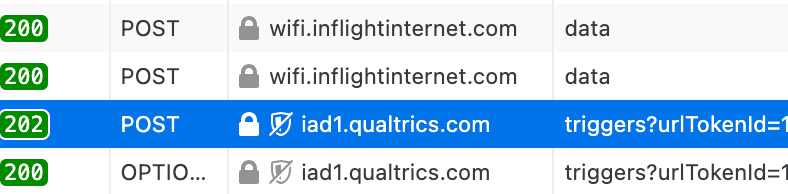
However, after F12ed the onboard WiFi portal I did find connections to iad1.qualtrics.com. Now this is likely ad tracking or debugging telemetry services. When I visit the website, it does load, and pretty fast actually. So this got me thinking, for messaging services it's possible that they use some kind of ip white list and sni doesn't work, but for this website most likely it only relyed on sni.
So I quickly edited the config, and add the following outbound entry (in singbox)
{
      "type": "vmess",
      "tag": "vmess-out",
      "server": "redacted",
      "server_port": 443,
      "uuid": "redacted",
      "transport": {
        "type": "http",
        "host": ["www.qualtrics.com"],
        "path": "/",
        "method": "GET"
      },
      "tls": {
        "enabled": true,
        "server_name": "www.qualtrics.com",
        "insecure": true,
        "alpn": ["h2", "http/1.1"]
      }
    },
And somehow it just worked. The download speed is around 30Mbps, not too bad for onboard WiFi. Delay however is terrible around 900ms.
After I got connected I sent a few emails and slept through the rest of the flight.