
差不多一年前我从 KeepassXC (开源密码管理器) 切换到了 StrongBox。 StrongBox 基本是唯一一个在 Mac 上体验能和 1Password 扳一扳手腕,如果不考虑跨平台(我没有苹果手机) 的话体验甚至还有优于 1Password 的软件。相比 KPXC,对我来说最大的优势是系统级支持 Passkey (KPXC 的 Passkey 是通过浏览器插件实现的,不能兼容一部分 Passkey)。并且,因为 Strongbox 完全兼容 Keepass 格式,用 Strongbox 编辑过的 kdbx 数据库可以用 KeepassXC 无缝衔接编辑。
版本 1.60.35
我在 25 年 2 月开始了 3 个月的 Strongbox Pro 试用 (使用 Appstore 试用)。 结果是,一直到 26 年的 3 月份我仍然在继续用 Pro 并且没有交过钱,尽管 Appstore 的订阅早已过期。
究其原因,发现这个版本的 Strongbox 把购买状态储存在 ~/Library/Group Containers/group.strongbox.mac.mcguill/Library/Preferences/group.strongbox.mac.mcguill.plist 文件的 fullVersion bool 值里。离谱的是,在储存了状态之后 Strongbox 在这 9 个月的时间里没有验证过一次购买状态。
Appstore 的最新版本已经修复了这个 Bug, 但是我仍然可以通过使用这个旧版本的 App,然后手动覆盖 fullVersion 值就好
plutil -replace fullVersion -bool true "~/Library/Group Containers/group.strongbox.mac.mcguill/Library/Preferences/group.strongbox.mac.mcguill.plist"(我把旧版本的 App 备份在这里)
Strongbox 从 1.60.35 版本到截止发文的 1.64.2 这一年里除了加了一个 Liquid Glass 和储存信用卡的选项,其他变化不大。考虑到 Strongbox 在 25 年 3 月份被 Applause 收购,以后大概也不会有大更新了,这个版本可以一直用下去。
对新版本的逆向尝试
但是一直使用旧版本总归是让人很不爽。升级到新版本的 Strongbox 之后会发现修改 plist 的办法已经失效了,将 fullVersion 设置为 true 之后下一次启动又会被立刻还原回来。
使用 Hopper 打开 /Applications/Strongbox.app/Contents/MacOS/Strongbox 可知行文件。 用 Strongbox 随便加载一个数据库,然后点开 About 页面。
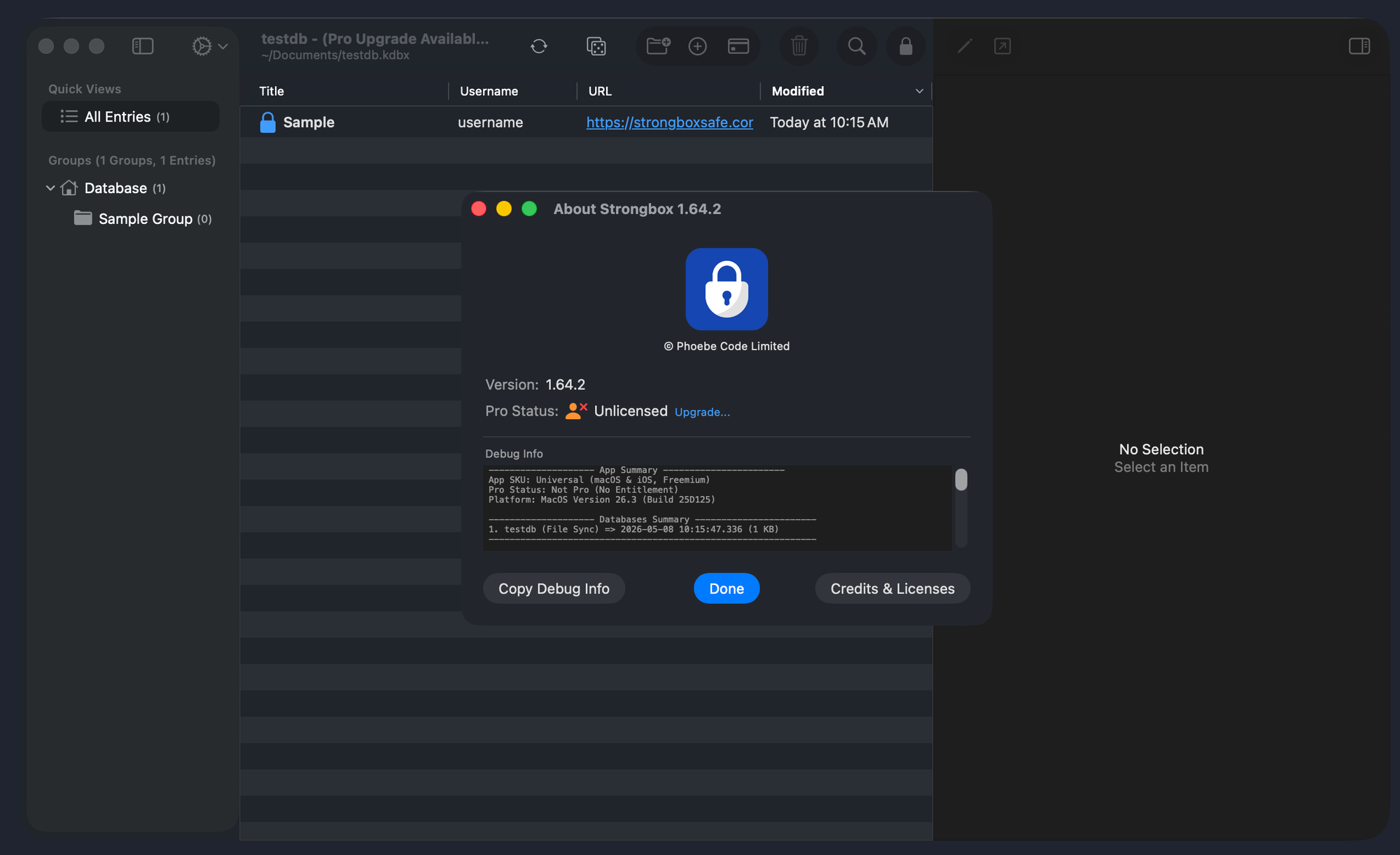
可以看到一个 Pro Status "Unlicensed" 字样。搜索字符串 "Unlicensed"

然后搜索 reference to, 点进 0x101c50120 这里,然后继续查找 reference to,可以找到类函数 AboutViewController.bindVersionAndProStatus。用 Hopper 反编译然后整理了一下,设置文字的核心逻辑代码大致如下
// Choose license status text.
if (MacCustomizationManager.isSetapp) {
    labelLicense.stringValue = localized("pro_status_setapp");
    hideChangeLicense = true;
} else if (MacCustomizationManager.isAProBundle) {
    labelLicense.stringValue = localized("pro_status_lifetime_pro");
    hideChangeLicense = true;
} else if (Settings.sharedInstance.isPro) {
    if (ProUpgradeIAPManager.sharedInstance.isLegacyLifetimeIAPPro) {
        labelLicense.stringValue = localized("pro_status_lifetime_pro_iap");
        hideChangeLicense = true;
    } else if (ProUpgradeIAPManager.sharedInstance.hasActiveYearlySubscription) {
        labelLicense.stringValue = localized("pro_status_yearly_pro");
        hideChangeLicense = false;
    } else if (ProUpgradeIAPManager.sharedInstance.hasActiveMonthlySubscription) {
        labelLicense.stringValue = localized("pro_status_monthly_pro");
        hideChangeLicense = false;
    } else {
        labelLicense.stringValue = localized("pro_badge_text");
        hideChangeLicense = true;
    }
} else {
    if (Settings.sharedInstance.daysInstalled >= 61) {
        labelLicense.stringValue = localized("pro_status_unlicensed_please_upgrade");
        labelLicense.textColor = red;
    } else {
        labelLicense.stringValue = localized("pro_status_unlicensed");
        labelChangeLicense.stringValue = localized("generic_upgrade_ellipsis");
    }

    hideChangeLicense = false;
}
查询 isAProBundle 代码,代码如下
/* @class MacCustomizationManager */
+(bool)isAProBundle {
    r0 = [_TtC9Strongbox22StrongboxProductBundle isAProBundle];
    return r0;
}
[Strongbox isAProBundle] 汇编代码如下
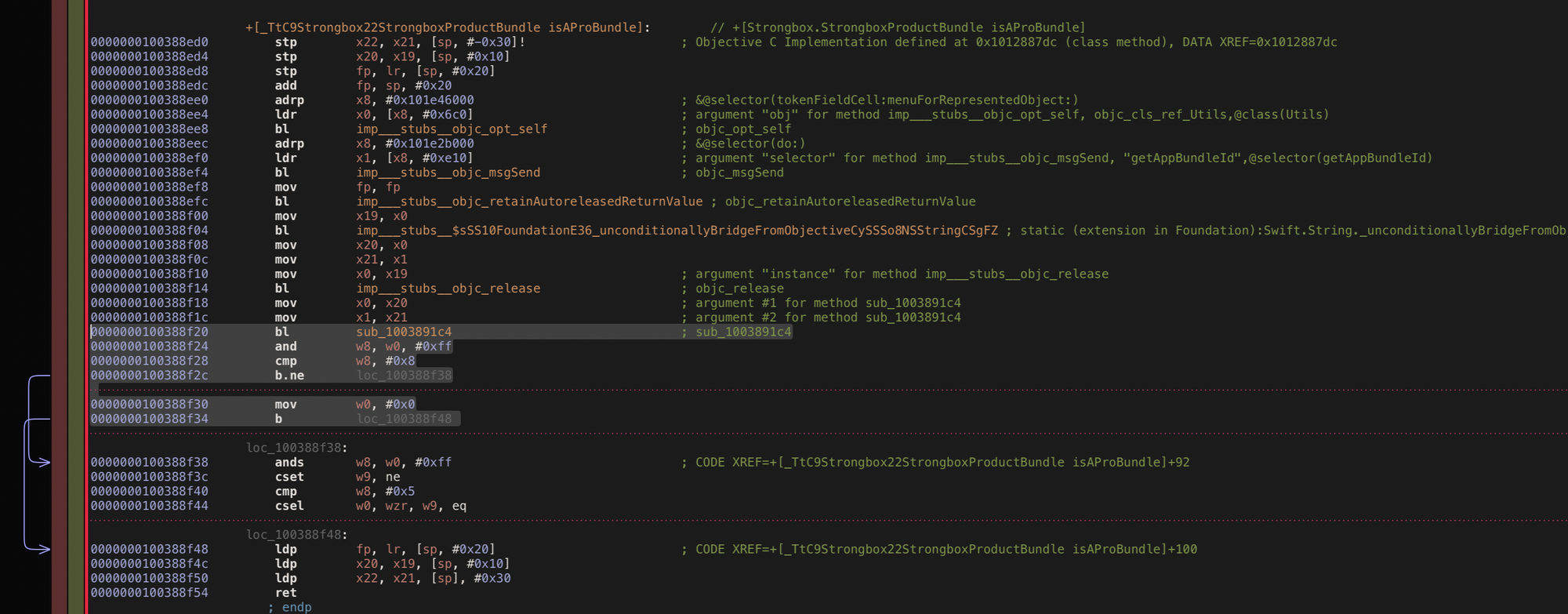
可以看到, 8f20 调用了一个过程,然后通过该过程的返回值来决定函数的返回值。这个函数只有一个 ret,所以只需要在合适的地方改成 1 就好了。因为懒得去看入栈出栈代码,我选择在靠近末尾的地方把返回值改成 1
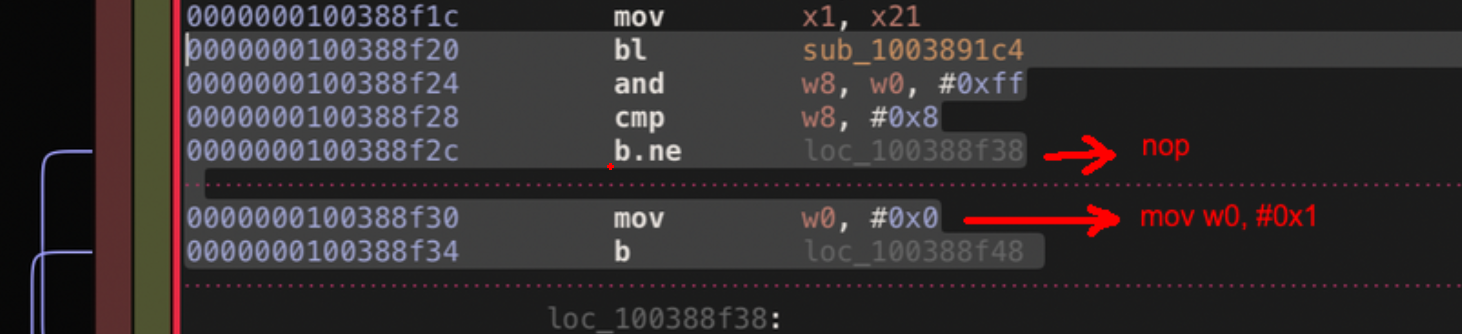
保存,然后 File -> Produce New Executable, 得到 Strongbox_patched
将这个修改过的二进制替换原来的 Strongbox 文件,然后运行:

为什么被杀掉了?查找一番后发现是被 Mac 的保护机制杀掉了,我修改了这个程序导致签名无效了。尝试对之重新签名:
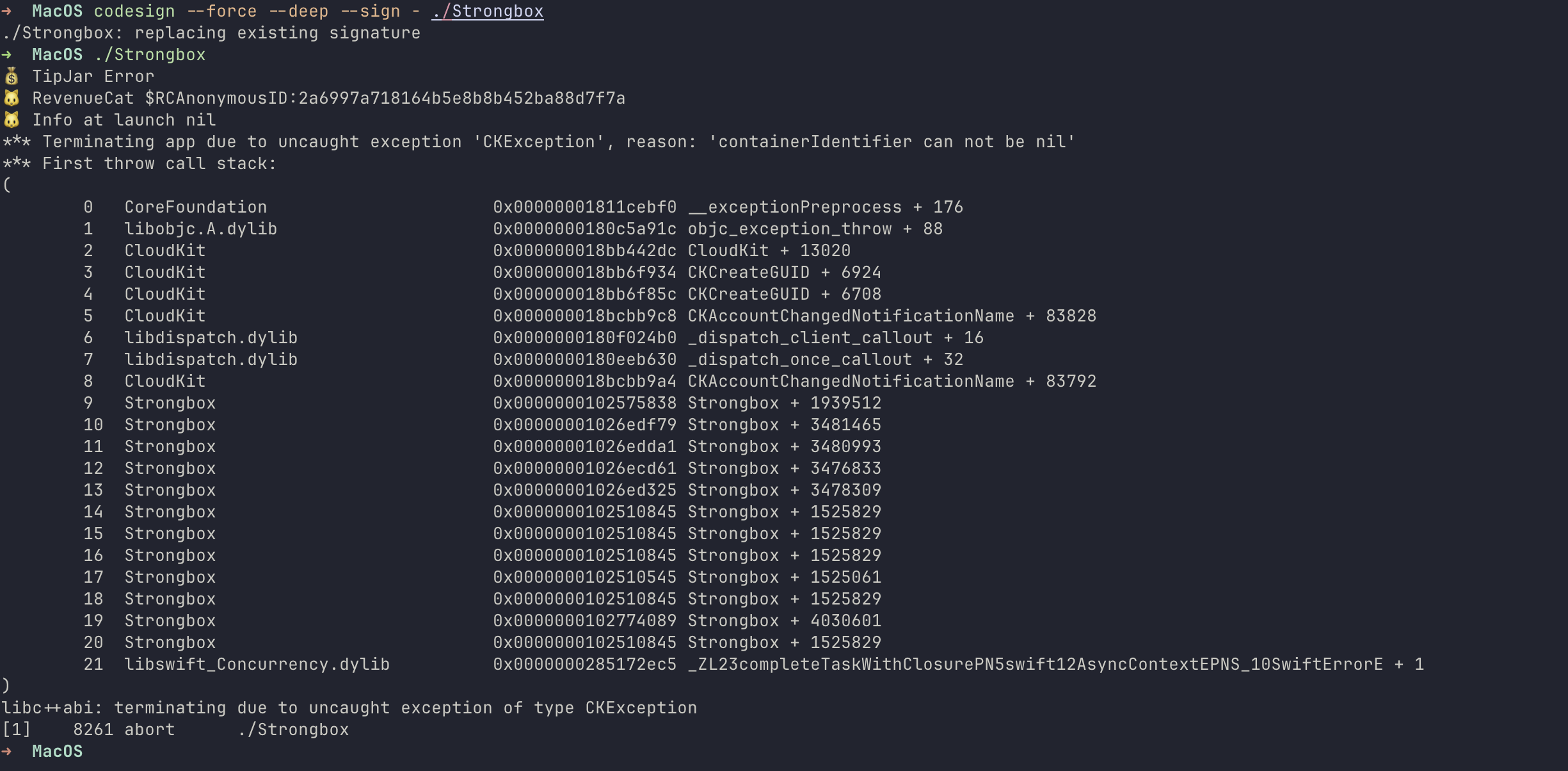
可以运行了,一个窗口甚至一闪而过。然而很快就崩溃了。看 Trace,似乎是 CloudKit 出了问题。查找后得知,Strongbox 拥有一些 Entitlements,我们自己签名过后移除了原来的 Entitlements。Cloudkit 部分代码没有 Entitlements 自然无法工作。
 codesign -d --entitlements :- /Applications/Strongbox.newest.app > app_entitlements.plist
  plutil -convert xml1 app_entitlements.plist
  plutil -lint app_entitlements.plist
(这样导出 xml 格式的 Entitlements)
也许我可以通过 NOP 一些代码直接关掉 Cloudkit 的功能,因为我本来也没有用到 iCloud 相关的功能。但是有一些比较关键的 Entitlement 比如 com.apple.developer.authentication-services.autofill-credential-provider 如果关掉了 Passkey 的功能就直接无法使用。这些 Entitlements 我应该也可以自己用 xcode 生成,但是这会需要一个每年 99 美刀的 Apple developer 账户,我没有这个账户。
所以通过硬改二进制文件的方法证明行不通。
通过 Frida Hook 函数返回值
通过 Frida 注入需要提前关闭 SIP (系统完整性保护)
既然不能硬改二进制文件,也许可以通过 Frida 进程注入来实现更改函数返回值。既然我已经确定了要修改的函数,可以通过一个 hook 脚本来修改返回值:
// hook.js
(function () {
  const className = "_TtC9Strongbox22StrongboxProductBundle";
  const cls = ObjC.classes[className];
  const method = cls["+ isAProBundle"];

  console.log("Hooking implementation:", method.implementation);

  Interceptor.attach(method.implementation, {
    onLeave(retval) {
      console.log("Replacing original", retval.toInt32(), "to 1");
      retval.replace(ptr("0x1"));
    },
  });
})();
执行: frida -f /Applications/Strongbox.app/Contents/MacOS/Strongbox -l hook.js ,启动并 Hook Strongbox 进程。
打开 About 页面,可以看到 Strongbox 确实已经被破解成功了。
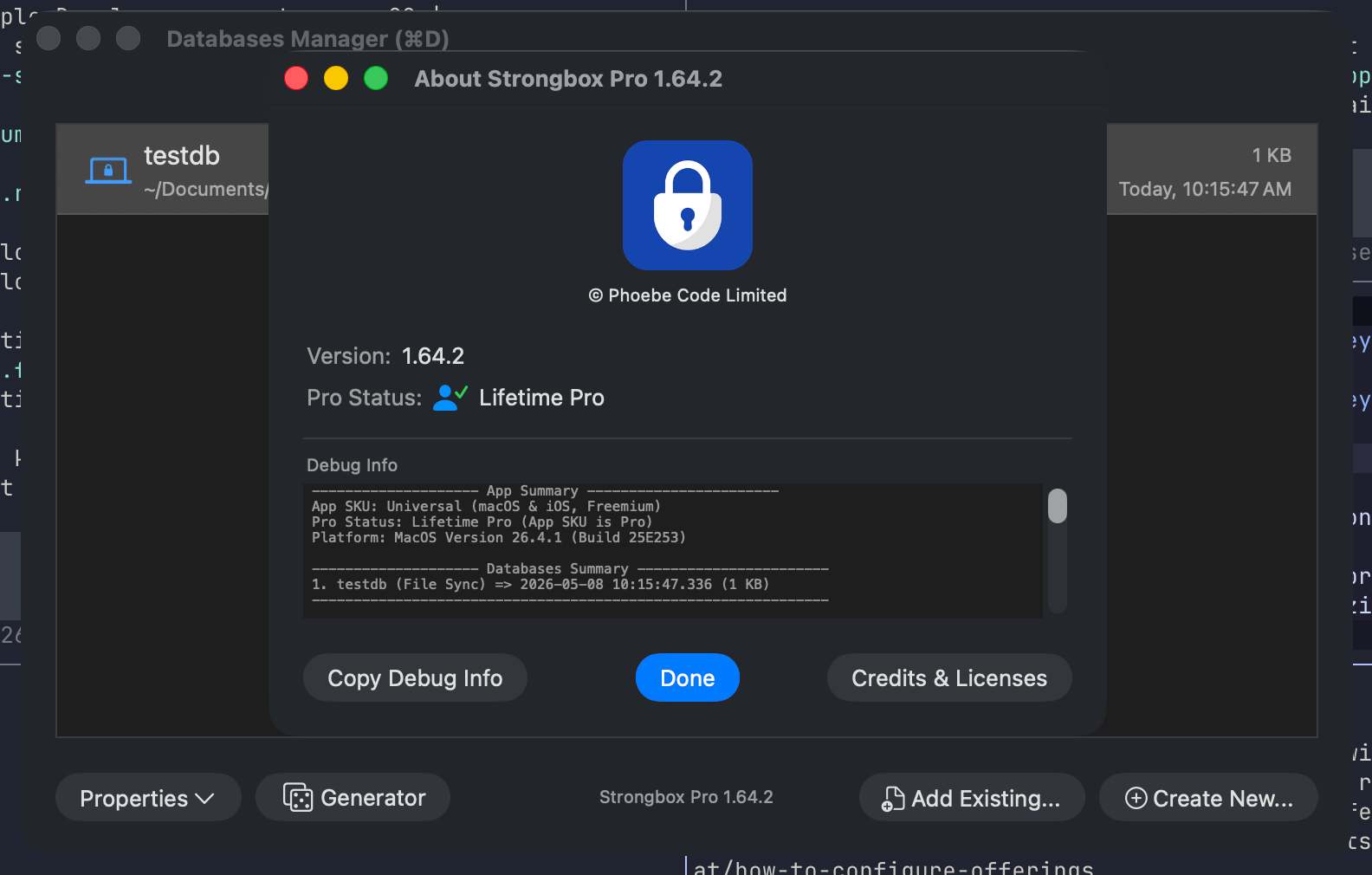
不过通过 Frida Hook 函数返回值的方法仍然需要用 Frida 启动程序,对于日常使用来说仍然不是很方便。
使用 MITM 破解内购
使用 Proxyman 对 Strongbox 抓包可以发现,Strongbox 在刚刚安装完毕后第一次启动,或者在点击恢复内购的时候,会 POST https://api.revenuecat.com/v1/receipts。内容大致如下
// Request Body
{
  "attributes": {
    "$attConsentStatus": {
      "updated_at_ms": 1778154717490,
      "value": "denied"
    }
  },
  "app_user_id": "$RCAnonymousID:REDACTED",
  "is_restore": true,
  "observer_mode": false,
  "initiation_source": "restore",
  "fetch_token": "REDACTED"
}

// Response Body
{
  "request_date": "2026-05-01T00:00:00Z",
  "request_date_ms": 1778154723736,
  "subscriber": {
    "entitlements": {
      "pro": {
        "expires_date": "2025-05-01T00:00:00Z",
        "grace_period_expires_date": null,
        "product_identifier": "com.example.app.pro.yearly",
        "purchase_date": "2025-02-06T23:01:23Z"
      }
    },
    "first_seen": "2025-02-01T00:00:00Z",
    "last_seen": "2026-05-01T00:00:00Z",
    "management_url": null,
    "non_subscriptions": {},
    "original_app_user_id": "$RCAnonymousID:REDACTED",
    "original_application_version": "REDACTED",
    "original_purchase_date": "2025-02-01T00:00:00Z",
    "other_purchases": {},
    "subscriptions": {
      "com.example.app.pro.yearly": {
        "auto_resume_date": null,
        "billing_issues_detected_at": null,
        "display_name": "Upgrade to Pro (Yearly)",
        "expires_date": "2025-05-06T22:01:23Z",
        "grace_period_expires_date": null,
        "is_sandbox": false,
        "original_purchase_date": "2025-02-01T00:00:00Z",
        "ownership_type": "PURCHASED",
        "period_type": "trial",
        "price": {
          "amount": 0.0,
          "currency": "CAD"
        },
        "purchase_date": "2025-02-01T00:00:00Z",
        "refunded_at": null,
        "store": "app_store",
        "store_transaction_id": "REDACTED",
        "unsubscribe_detected_at": "2025-05-01T00:00:00Z"
      }
    }
  }
}
尝试使用 Proxyman 拦截并修改返回数据,在 Menu -> Scripting 里面新建一个脚本:
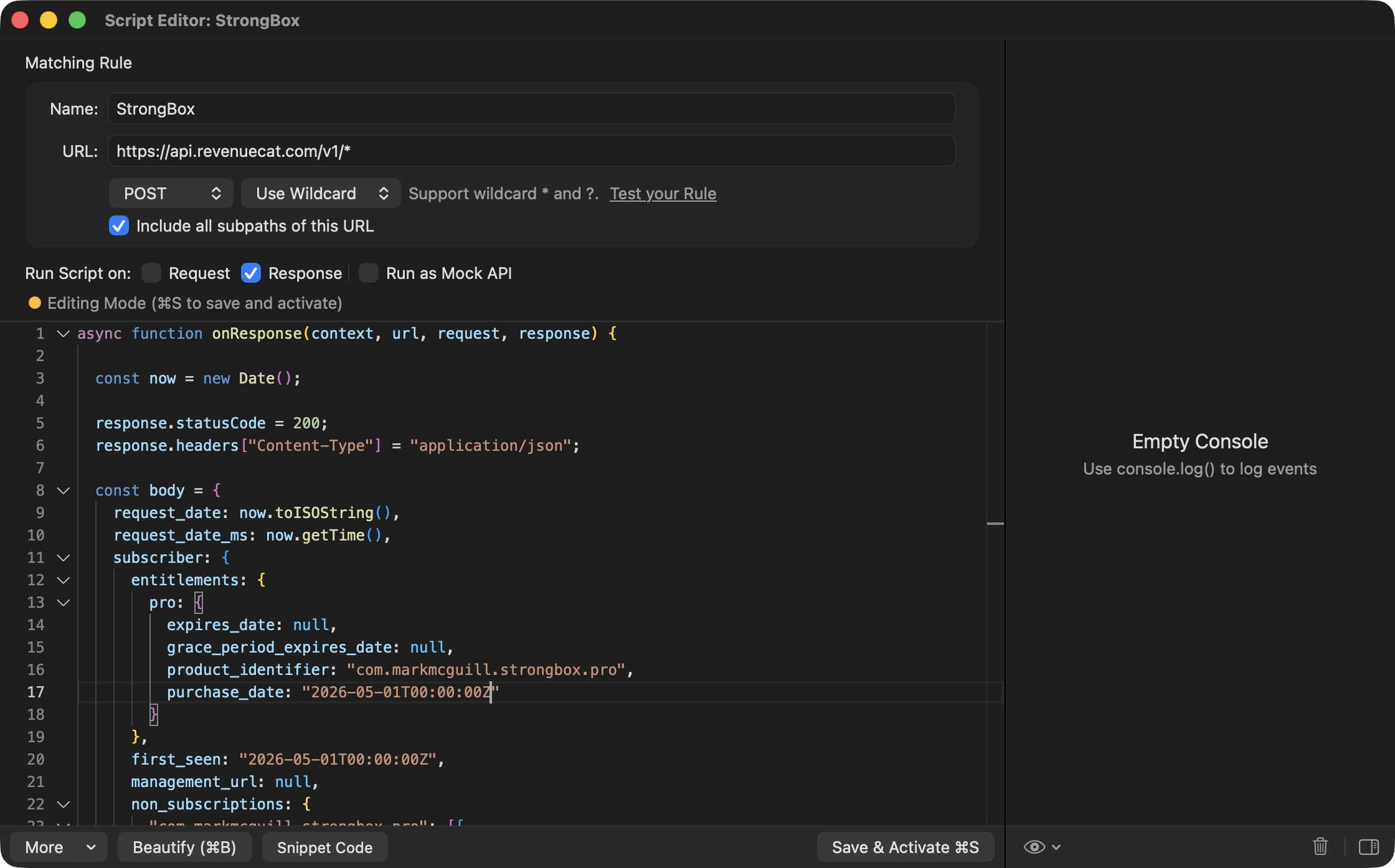
脚本内容使用
async function onResponse(context, url, request, response) {

  const now = new Date();

  response.statusCode = 200;
  response.headers["Content-Type"] = "application/json";

  const body = {
    request_date: now.toISOString(),
    request_date_ms: now.getTime(),
    subscriber: {
      entitlements: {
        pro: {
          expires_date: null,
          grace_period_expires_date: null,
          product_identifier: "com.markmcguill.strongbox.pro",
          purchase_date: "2026-05-01T00:00:00Z"
        }
      },
      first_seen: "2026-05-01T00:00:00Z",
      management_url: null,
      non_subscriptions: {
        "com.markmcguill.strongbox.pro": [{
          id: "transaction_or_revenuecat_id",
          is_sandbox: false,
          purchase_date: "2026-05-01T00:00:00Z",
          store: "app_store"
        }]
      },
      original_app_user_id: "$RCAnonymousID:...",
      original_application_version: "1.0",
      original_purchase_date: "2026-05-01T00:00:00Z",
      other_purchases: {},
      subscriptions: {}
    }
  };

  response.body = JSON.stringify(body);
  return response;
}
运行,然后在 Strongbox 里面点击恢复内购。片刻之后,内购已经被成功解锁了。
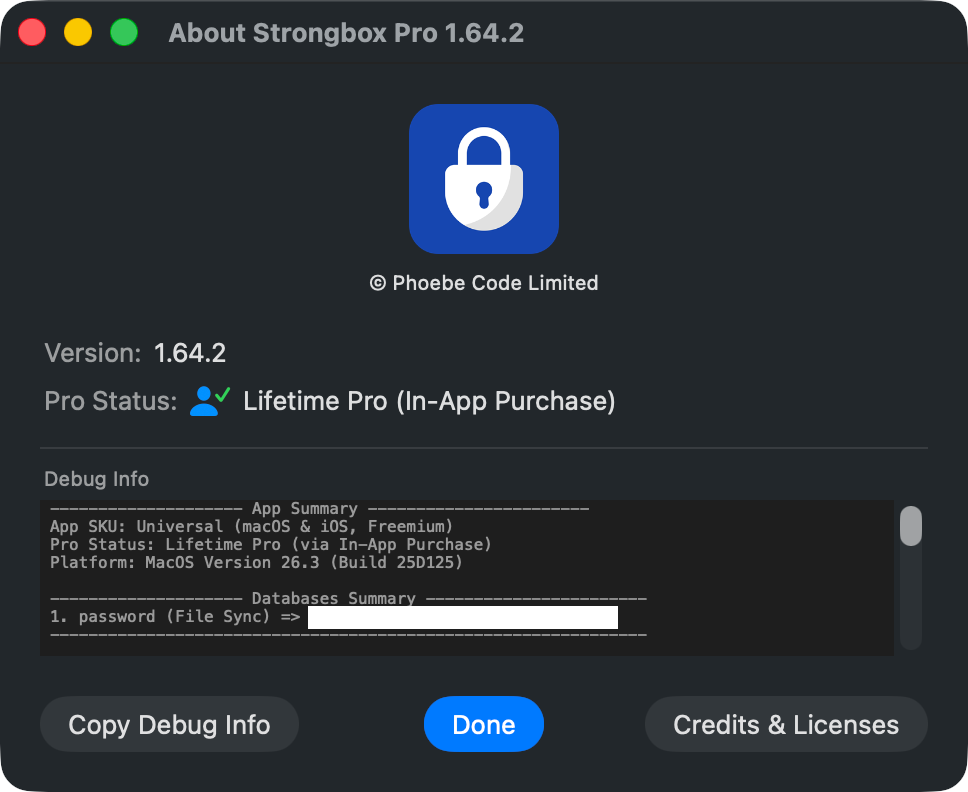
接着在 /etc/hosts 里面添加黑名单防止 Strongbox 检查域名。
127.0.0.1 api.revenuecat.com至此就大功告成了。从 plist 的键值对里可以推测 Strongbox 似乎有或者曾经有过检测 Pro 失败超过一定次数后降级到普通版本的机制,不过我开开关关了好几次也没有遇到过。如果我遇到了降级问题,我会更新这篇博文。
备注 1: 似乎使用 RevenueCat 的很多软件都可以使用 MITM 方式破解。我发现下面这个 Repo 收录了很多类似内容可供参考。
 Guding88
备注2: 我将 1.64.2 的 Strongbox 版本也一并备份到这里。
参考资料
 Thomas

 marlkiller
Comments